
GIF vs MP4 vs SVG: Which Format Should You Export?
By Rajeev Ranjan · Updated November 2026 · 5 min read
You have built an animated diagram and the export dialog offers three formats: GIF, MP4 and SVG. They are not interchangeable. Each is best somewhere and awkward somewhere else, and picking the wrong one is the usual reason an animation "does not work" in a slide, an email or a README. Here is how they differ and how to choose.
The short version
| If you are putting it in… | Use | Why |
|---|---|---|
| A slide deck | GIF, or MP4 | GIF just plays in slideshow mode. MP4 is sharper if you can set it to autoplay and loop. |
| A README or documentation page | SVG | Tiny, crisp at any zoom, and animates when shown as an image in a browser. |
| An email or chat message | GIF (Small) | Plays inline in most clients without any setup. |
| A social post or story | MP4 | Best quality for the size, and you can crop to square or vertical. |
| A web page you control | SVG, or MP4 | SVG for crisp and light, MP4 if you need exact visual fidelity. |
When in doubt, export a GIF: it is the one that nearly everything accepts.
GIF
What it is: a sequence of pictures that loops by itself. The format is old, which is exactly why it plays almost everywhere.
- Strengths: the widest compatibility, loops automatically, and needs no player or controls.
- Limits: up to 256 colours, so soft glows and gradients can show slight banding; files are larger than video for the same quality; there is no sound (not needed for a diagram).
- Size and quality: three presets. Small is 15 frames per second and up to 960 pixels wide, Balanced is 20 fps and 1280 pixels, and Best is 30 fps and 1920 pixels. For a three-second diagram of about 1200 × 700 pixels, expect roughly 0.6 MB (Small) to 1.4 MB (Best).
MP4 (video)
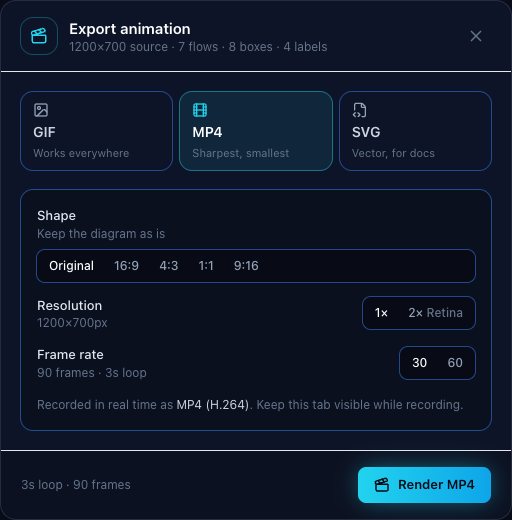
What it is: a normal video file. DiagramPulse records it in real time from the diagram, at 30 or 60 frames per second.
- Strengths: the sharpest text and smoothest glow, and usually the smallest file for the same quality.
- Limits: it does not loop on its own where you paste it. You have to switch on loop and autoplay in the place you use it. It is also recorded in real time, so a three-second loop takes about three seconds to produce, and the browser tab must stay visible while it records.
- Browser caveat: whether you get MP4 or WebM depends on your browser. Chrome, Edge and Safari can usually record MP4; where a browser cannot, you get WebM instead. WebM is fine on the web but may not play in PowerPoint.
SVG (animated vector)
What it is: a vector image whose arrows and dots are animated by the browser itself, with no scripts and no external files inside. The sample on our home page is exactly this, at about 34 KB.
- Strengths: a very small file; perfectly sharp at any size and on any screen; it carries your boxes, logos, labels and animation; and it works as a normal image in a web page or a README.
- Limits: it only animates where the viewer supports it. Browsers do. Many email clients, chat apps and slide editors show a still picture or nothing at all, so do not use it there.
- Tip: test it in the exact place you plan to publish it. Some tools strip or freeze SVG animation.
Other choices in the dialog
- Shape: Original keeps the diagram as drawn. 16:9 suits slides and YouTube, 4:3 classic slides, 1:1 square posts, and 9:16 stories and reels. The extra space around the diagram is filled so it looks intentional.
- Resolution: 1× or 2× Retina. Use 2× when the result will be shown large or on high-density screens.
- Loop length: set under the canvas: 2, 3, 4 or 5 seconds. The export repeats seamlessly. If a flow uses a half-step speed (such as 1.5×), the export spans two loops so the join stays invisible.
Ready to try them? Build something in the editor, or follow the architecture diagram guide first.